News

Local RESX Editor version 1.2.0 released!
Saturday, November 7, 2026
6/29/202656.21 MB
Changelog:
- Local RESX Editor 1.2 helps you ship complete and correct translations.
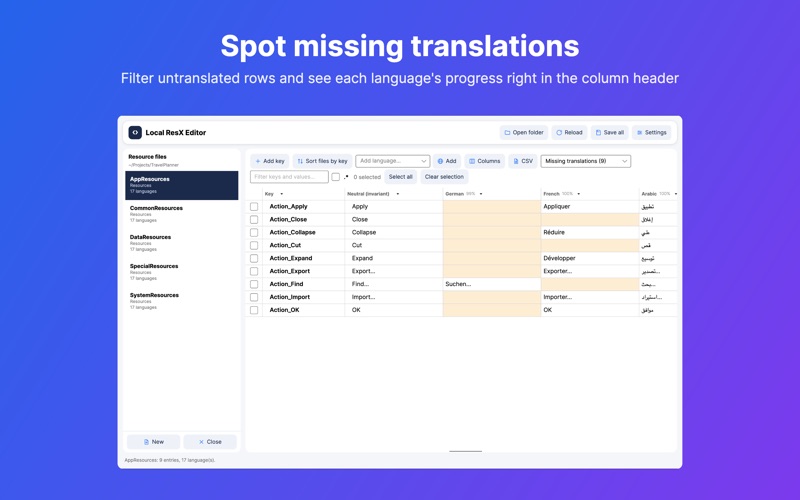
- New view filter: show only rows with missing translations or with possible issues
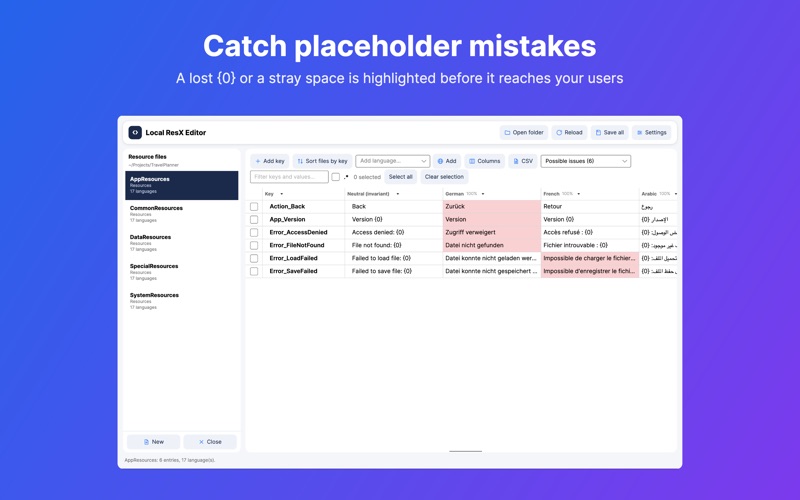
- Placeholder check: translations whose {0} placeholders or surrounding spaces differ from the neutral text are highlighted, with an explanation on hover
- Progress per language right in the column header
- Rename a key in every language file at once
- CSV export and import for working with translators (Excel-friendly)
- The neutral column and the resource list are now fully translated
- Updated app framework and build tools for more stability
- Many refinements and fixes
Download on the
App Store
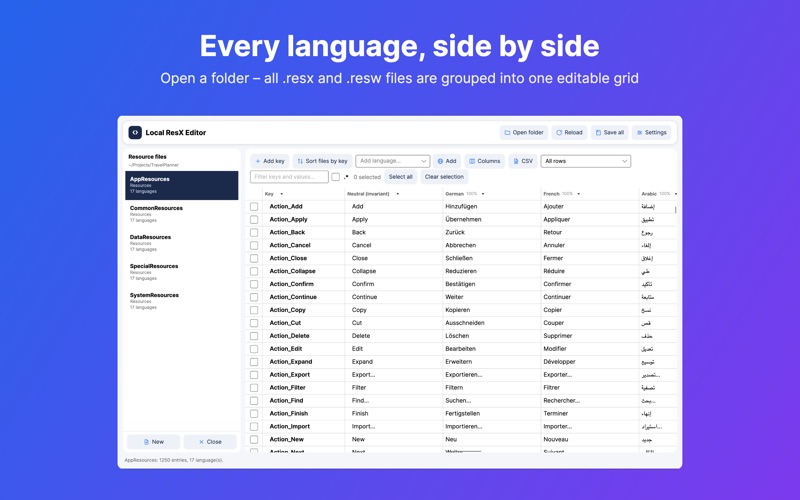
Local RESX Editor is a native Mac app for .NET developers who localize their apps. Open a project folder and see every .resx and .resw resource file side by side, in every language, in one fast and fully editable grid.
OPEN A FOLDER, SEE EVERY STRING
The app scans your project recursively, finds all resource files and groups each file's language variants. Strings.resx, Strings.de.resx and Strings.fr.resx become one entry with one column per language. No more jumping between files.
FIND WHAT IS MISSING
Switch the view to "Missing translations" and only the rows that still need work remain. Every language column shows its progress in the header, so you know at a glance how far German, Japanese or Arabic have come.
CATCH MISTAKES BEFORE YOUR USERS DO
A translation that lost its {0}, swapped {1:N2} for something else, or gained a stray trailing space is highlighted in red. Hover over the cell to see exactly what differs from the neutral text, or switch to "Possible issues" to review them all.
EDIT EVERYTHING IN PLACE
Click a cell to edit a translation. Add a key and it appears in every language. Rename a key and it is renamed in every language file. Delete a key and it disappears everywhere. Add a language and the satellite file is created when you save. Multi-line values are fully supported.
WORK WITH TRANSLATORS
Export a resource file as an Excel-friendly CSV, send it to your translator and import the result back in one step. Columns are matched by language code, new keys are added and nothing is overwritten with empty cells.
AI TRANSLATION, LOCAL AND PRIVATE
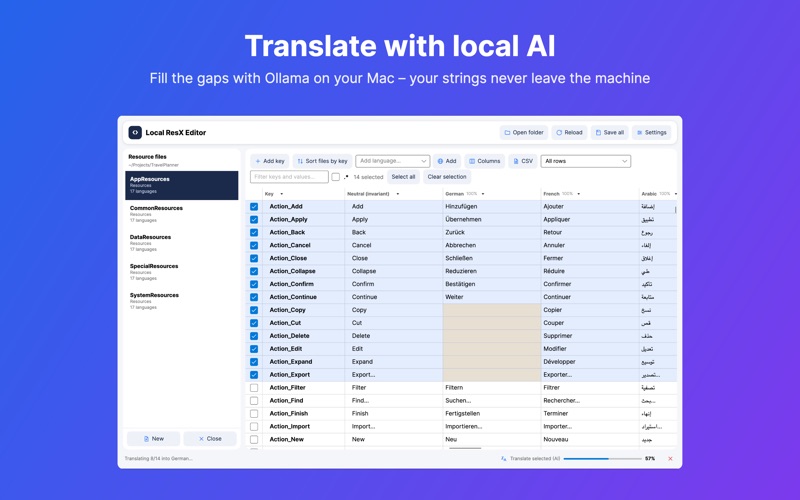
Connect a locally running Ollama instance, select rows and let your own model fill the gaps from the neutral language. Every request stays on your Mac – your strings never leave your machine.
FULL CONTROL OVER THE GRID
Resize, reorder, pin, hide and sort columns, filter each column, search keys, values and comments at once – with regular expressions if you like. Your layout is remembered.
FORMAT-PRESERVING SAVES
Saving keeps whitespace, comments, XML structure and node order exactly as they were. Only changed files are written, so your version-control diffs stay clean. "Sort files by key" reorders all entries alphabetically in every language file in one step.
BUILT FOR THE MAC
Runs fully sandboxed, works offline, collects no data and has no tracking. Light and dark mode, keyboard shortcuts and a UI in ten languages.
Local RESX Editor is also available for Windows in the Microsoft Store.
OPEN A FOLDER, SEE EVERY STRING
The app scans your project recursively, finds all resource files and groups each file's language variants. Strings.resx, Strings.de.resx and Strings.fr.resx become one entry with one column per language. No more jumping between files.
FIND WHAT IS MISSING
Switch the view to "Missing translations" and only the rows that still need work remain. Every language column shows its progress in the header, so you know at a glance how far German, Japanese or Arabic have come.
CATCH MISTAKES BEFORE YOUR USERS DO
A translation that lost its {0}, swapped {1:N2} for something else, or gained a stray trailing space is highlighted in red. Hover over the cell to see exactly what differs from the neutral text, or switch to "Possible issues" to review them all.
EDIT EVERYTHING IN PLACE
Click a cell to edit a translation. Add a key and it appears in every language. Rename a key and it is renamed in every language file. Delete a key and it disappears everywhere. Add a language and the satellite file is created when you save. Multi-line values are fully supported.
WORK WITH TRANSLATORS
Export a resource file as an Excel-friendly CSV, send it to your translator and import the result back in one step. Columns are matched by language code, new keys are added and nothing is overwritten with empty cells.
AI TRANSLATION, LOCAL AND PRIVATE
Connect a locally running Ollama instance, select rows and let your own model fill the gaps from the neutral language. Every request stays on your Mac – your strings never leave your machine.
FULL CONTROL OVER THE GRID
Resize, reorder, pin, hide and sort columns, filter each column, search keys, values and comments at once – with regular expressions if you like. Your layout is remembered.
FORMAT-PRESERVING SAVES
Saving keeps whitespace, comments, XML structure and node order exactly as they were. Only changed files are written, so your version-control diffs stay clean. "Sort files by key" reorders all entries alphabetically in every language file in one step.
BUILT FOR THE MAC
Runs fully sandboxed, works offline, collects no data and has no tracking. Light and dark mode, keyboard shortcuts and a UI in ten languages.
Local RESX Editor is also available for Windows in the Microsoft Store.